React Native
CANDIES
Most React Native tutorials leave you stuck copying code you do not understand, shipping apps that crash in production, with no clear path to the store. This course takes you from zero to a polished subscription tracker named Subscribed, with Expo Router, Zustand, TanStack Query, push notifications, deep linking, home screen widgets, local persistence, and code you are proud to open again.
Learn to Build Beautiful Apps, Even If You Are Just Getting Started
You build Subscribed, a subscription tracker from scratch: onboarding, service search, billing cycles, renewal reminders, spend summaries, push notifications, and a clear path to the App Store and Google Play. One course, one app. When you finish, you have working code, a portfolio project, and a clear next project to start.
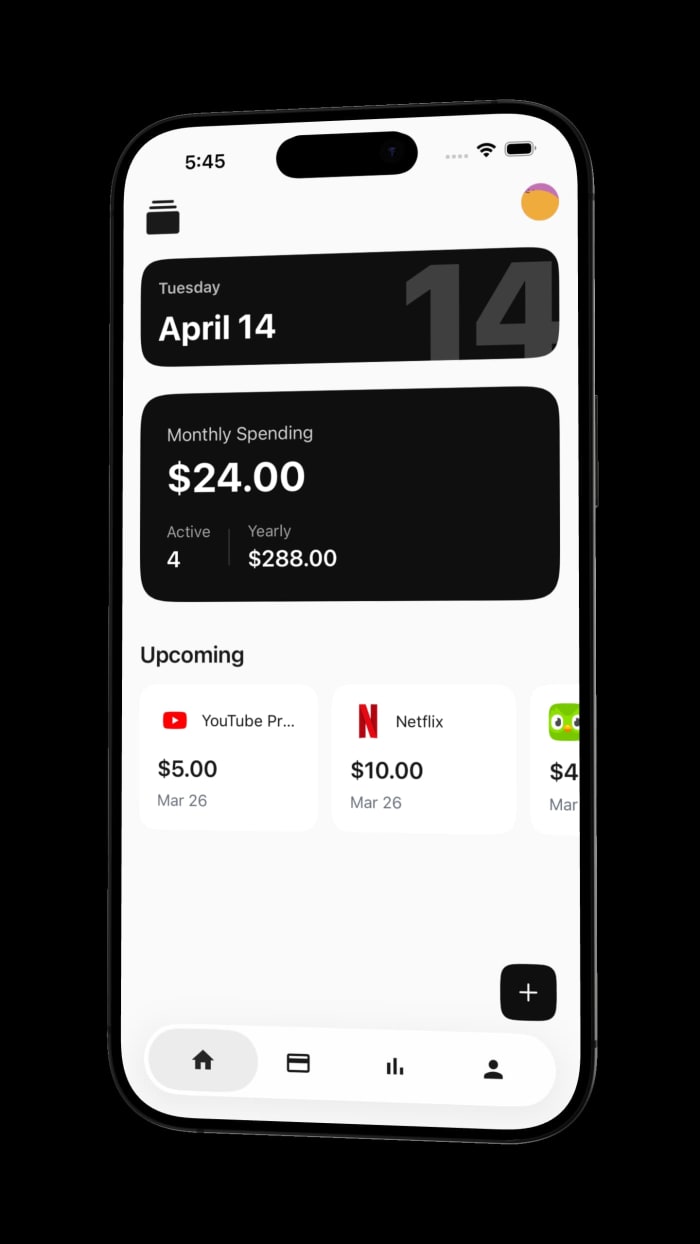
Build This
Production-Ready App
A polished subscription tracker with service search, recurring billing cycles, renewal reminders, category insights, and a premium mobile UI

Included in thecourse

React Native Component Library
Text, View, Image, FlatList, and ScrollView. The building blocks you reuse on every screen, with typing and layout patterns that hold up in production.

React Native in TypeScript
No separate syntax module—every lesson is typed. You pick up interfaces, props, navigation params, and API shapes while building Subscribed.

Expo Router & Navigation
Routes from your app folder, tab stacks, modals, and protected screens. If you have used Next.js, the folder structure will feel familiar.

TanStack Query & API Integration
Fetch, cache, and refresh server data without a tangle of useEffect calls. Loading, error, and success states you can reuse across screens.

State Management with Zustand
A small global store for currency, theme, and subscription data. No provider tree and not much boilerplate.

Voltra for Widgets
Home screen widgets in React Native with Voltra—WidgetKit and Glance layouts, sync, and previews without leaving TypeScript.

Pulsar for Haptics
Named haptic presets and system feedback with Pulsar. Tap a preset on device, then wire the same feel into Subscribed.

App Store Deployment Guide
EAS builds, signing, store listings, and submission for iOS and Android. Get Subscribed from a local build to TestFlight and Play Console.
Agent Device
Callstack's CLI for AI agents—drive simulators and real devices, capture accessibility snapshots, and verify flows without burning context.
Argent for AI Agents
Software Mansion's agentic toolkit—control simulators, inspect React trees, read network traffic, and profile performance from your editor.
The Curriculum
From React Native basics to a build on TestFlight and Play Console
React Native Fundamentals
Text, View, Image, and lists. The pieces every screen is built from.

Start with Text and View: props, styling, and Flexbox layout. Move into Image, FlatList, and ScrollView for lists and scrolling screens. The goal is a layout toolkit you reuse, not throwaway demos.
Building Real Applications
Go from knowing React Native to having a real app you can show off.
Turn the fundamentals into Subscribed and a notes app. You wire up project structure, screen navigation, service catalogs, reminders, local storage, and the form flows that hold up when real data shows up.
Modern State Management & APIs
Less flicker, less stale data, less state spaghetti.

Add Zustand for global state and TanStack Query for API data. You will hook up REST endpoints, handle loading and error states, try optimistic updates, and type the responses so refactors do not break screens silently.
Notifications, Deep Links & Polished App Flows
The features people actually use after install week.
Add renewal reminders, push notifications, deep links into subscription details, home screen widgets, and form flows that behave when the keyboard is open. These are the parts that separate a demo from something you would ship.
App Store Deployment & Publication
You finish with Subscribed on TestFlight or Play Console, not just a screen recording from the Simulator.


Walk through EAS builds, signing, store listings, and submission for iOS and Android. The same steps you use to get Subscribed from a local build onto TestFlight and into Play Console.
Why this course
is different ↘
Library selection & integration
Pick libraries with your eyes open: bundle size, maintenance cadence, TypeScript support, and how they fit an Expo app.
Modern tech stack
TypeScript, Expo Router, Zustand, TanStack Query, React Hook Form, MMKV, and Uniwind. The stack Subscribed uses, not a random dependency dump.
Complete app deployment to app stores
Signing, screenshots, review notes, and resubmission when Apple or Google push back. Both stores, same repo.
Discord community
A Discord channel for stuck builds, broken layouts, and store review questions. Post a screen recording, get a reply from other students and the instructor.
Course
Choose Your Access
Yearly access is $50/year and renews automatically each year unless you cancel before renewal. Lifetime access is a single $120 payment for every lesson, update, and source file.
Yearly Access
Renews automatically each year. Cancel before renewal.
Loading checkout options...
Lifetime Access
One payment. No recurring charge.
Loading checkout options...
Questions? Check out the FAQs or contact me.